


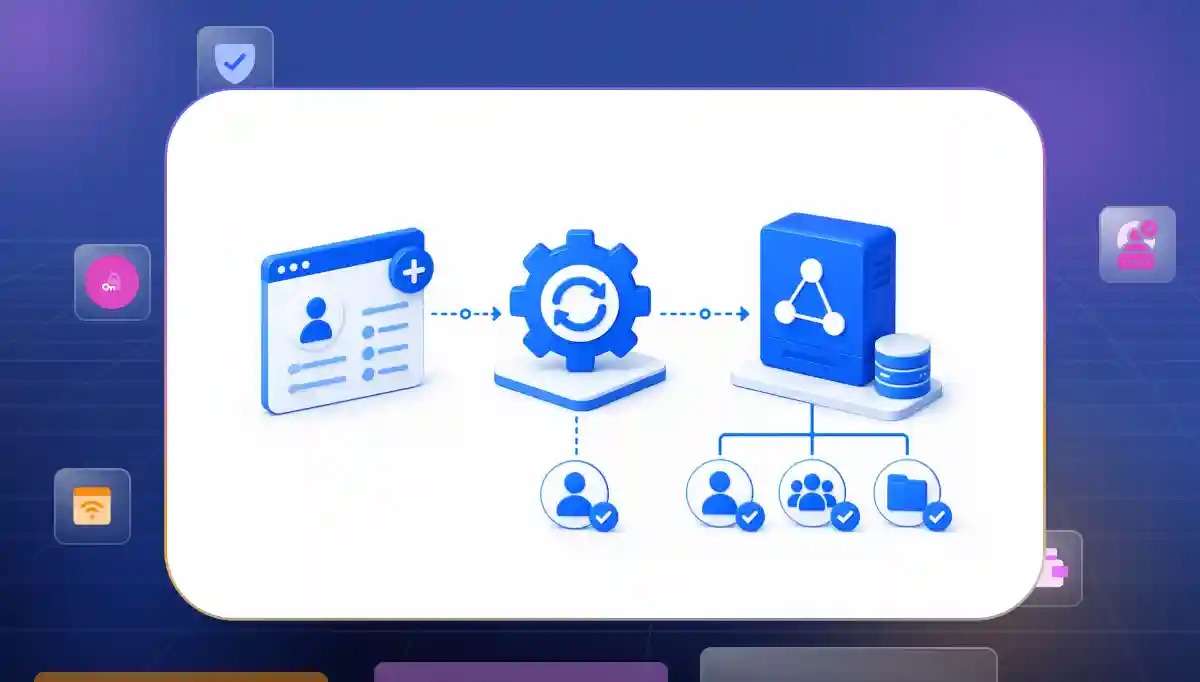

Setting up user accounts inside an organization can feel like a massive chore for IT teams. When a new person joins they need fast entry to folders files and email groups to start their job. For a long time tech teams had to type all this information by hand while moving data from paper sheets into deep computer systems.
To stop these slow routines engineering teams now use smart software to Automate User Provisioning Active Directory steps.
Where Manual AD Provisioning Creates the Gaps That Come Back as Security Problems
Manual directory setups often open hidden pathways for cyber threats due to basic human friction. Siloed departments pass data slowly and create heavy blind spots across your network systems. Let us explore the major threat zones where old identity management routines fail your system defense completely.
Aleksandr Buslayev (Microsoft Systems Engineer) highlights that Common Active Directory security risks include unconstrained delegation and stale privileged accounts. Other risks like lingering adminCount attributes and disabled LDAP signing also create security blind spots. You must also watch for unmanaged legacy service accounts to keep your system safe if left unaddressed.
The Threat of Orphaned Accounts and Slow Deprovisioning
Delayed exit processing leaves active entry portals unattended for long blocks of time. Former staff profiles sit silently on enterprise networks without regular credential rotation cycles.
- Delayed account terminations. When people leave the firm, old accounts stay open for days because HR forgot to tell the IT desk. This oversight gives bad actors a free pass to step in and copy your private work files.
- Unmonitored active footprints. Abandoned accounts stay active on servers without anyone altering their access keys or checking their logs. Hackers find these silent gates and use them to slip inside your network undetected.
- License resource waste. Keeping old profiles active means paying for cloud seats and software tools that nobody actually touches. This sloppy habit drains your cash every single month while leaving your network wide open to attacks.
Privilege Creep and Inaccurate Group Assignments
Permissions tend to accumulate rapidly when operations change but old profiles never get updated. Workers get extra administrative keys for small assignments but nobody cleans up their old profiles afterwards. Using a proper active directory user provisioning process is necessary to ensure access levels stay clean and controlled.
- Accumulated access rights. Employees who shift to new teams keep their old folder keys while gaining new ones at the same time. Holding too many keys breaks the basic safety rule of minimal access.
- Accidental group inheritance. Setting up a new hire by copying an old user profile often copies secret team access levels by mistake. This lazy approach gives new people instant keys to view payroll data or future plans.
- Broken data boundaries. When too many user profiles hold keys to administrative folders inside information leaks are bound to happen. Tracking down the source of a breach becomes impossible because too many profiles look exactly the same.
Human Errors in Security Configurations and Typo Risks
Typing data points manually results in chaotic data lines and broken configuration structures. A tiny text error can accidentally expose network file shares or block legitimate staff entries.
- Mismatched attribute fields. Small typos made while typing between HR lists and server databases break your data flow down the line. A simple spelling mistake can keep a worker from getting their right team files.
- Weak temporary passwords. Tech teams often use predictable repeating patterns for new hire keys because manual setup is a slow chore. These weak starting words leave new accounts wide open to guessing games on day one.
- Inconsistent naming conventions. Manual setups create a chaotic mix of different username formats all across your active network. A messy list makes tracking user histories highly confusing for your security team during safety checks.
What the Automated AD Provisioning Architecture Actually Needs to Cover
Modern directory management setups need a fluid engine that can track every single lifecycle shift automatically. Your core system must bridge data silos to create a perfect mirror of your employee status fields. Let us review the primary pillars that an advanced user provisioning automation layout must run.
Seamless HRIS Active Directory Integration
A unified framework turns your employee profile platform into the primary directory engine. Instant adjustments on the human resources panel trigger immediate security reactions across your digital workspace.
- Direct database syncing. Linking your main worker list straight to your network directory gets rid of manual file data entry. Any shift in a worker's status can automatically trigger updates across connected systems. These changes occur based on synchronization schedules and your workflow configurations.
- Real time profile generation. The machine spots a new hire entry and builds their email box and main folders right away. This rapid setup means new people can start working on their very first morning.
- Dynamic field mapping. Employee details like phone numbers, locations and job titles stay perfectly correct on all internal contact lists. Smooth automated updates keep your company phone books clean, accurate and helpful.
Managing the Whole Joiner Mover Leaver Active Directory Lifecycle
Staff operations are always moving as individuals arrive, shift duties or separate from your organization. Your network infrastructure must adapt to these internal steps cleanly to maintain a safe architecture. Here is how you run a tight joiner mover leaver Active Directory routine without human lag.
- Automated onboardings. The system handles the start phase by building the right files based on the official employment contract. A clean routine makes a smooth start for every single new hire who joins.
- Instant role changes. When a worker moves to a new team the engine strips away old keys and adds new ones. A fast swap stops people from holding onto keys that can hurt your safety.
- Secure automated deprovisioning AD steps. When an employee is marked as terminated, the workflow triggers account deactivation and access removal. These deprovisioning actions happen based on your organization's configuration. An instant lock stops old workers before they can even leave the building.
Enforcing Role Based Access Control and Identity Governance
Handing out custom network keys to single profiles creates a chaotic management setup over time. Security boundaries work much better when entry privileges are locked into standard group blueprints.
Industry IAM best practices typically recommend automating Joiner-Mover-Leaver workflows. You should assign access through business roles or role-based access control models rather than managing permissions individually.
- Template driven clearances. Access keys are tied directly to official job roles instead of single individual requests. If ten people do the exact same job they will hold the identical approved keys.
- Automated compliance tracking. The system logs every single account start shift and stop event without any human help. This tracking gives your team an unchangeable history list to show to company safety checkers.
- Periodic entitlement reviews. Managers can see exactly who holds keys to their folders by looking at simple clear dashboards. Good visibility lets leaders check and clean up folder access rules with one single click.
What to Ask Before You Choose an AD Provisioning Platform
Selecting an identity management system is a major technical choice that reshapes your security operations. You need an engine that secures your files today while expanding effortlessly as your database grows. Use these simple audit questions to evaluate any new directory vendor.
How Well Does the Platform Scale to Handle Enterprise Needs?
A software layout built for small offices can easily freeze when managing massive loads of active accounts. You must confirm that your network tools can process heavy data shifts without lagging.
- High volume stability. Ask if the system can run hundreds of profile shifts at once during big hiring months without lag. The tool must handle massive batches of data without dropping links or slowing down.
- Multi domain support. Check if the tool can manage separate networks and complex directory structures from one central screen. A single dashboard is key for firms that grow by buying up other companies.
- Cloud hybrid flexibility. Make sure the tool links old local servers and modern cloud spaces at the exact same time. Dual syncing keeps your user profiles perfectly unified across all your operational setups.
What Security Controls and Fail Safes Are Built In?
Directory sync tools operate with master administrative privileges which means they require immense platform security. Your choice must use internal firewall limits to stop accidental bulk account drops.
- Threshold delete protection. The platform must freeze and warn a boss if a script tries to wipe out too many profiles at once. A protective block stops major data loss caused by bad code lines.
- Granular audit tracking. Every single move made by the machine must be written down inside a safe external history file. Safe logs mean security teams can track down the root cause of any bad change.
- Secure API management. The software must use hidden tokens and safe links to talk directly to your employee lists. Safe connection lines keep personal details away from network snoopers and hackers.
How Simple is it to Customize Workflows Without Coding?
Corporate policies shift rapidly and you cannot afford to wait weeks for engineering teams to update basic access logic. Look for an interface that allows security managers to alter workflows instantly.
- Visual building tools. Tech workers should build onboarding paths with simple drag and drop blocks instead of writing deep code. Visual tools make layout adjustments fast and very easy to see.
- Custom attribute handling. The engine must map odd data points from old payroll sheets into standard network folders with ease. Direct mapping saves your tech team from doing messy data translation work by hand.
- Automated approval chains. The tool must send high level key requests to bosses for a digital sign off before opening files. Good routing keeps human eyes on the security choices that matter most.
Build Your AD Provisioning Workflow Today
Transitioning to automated identity tools is not just about saving time, it is about closing the scary safety gaps that leave your business open. Counting on manual profile work invites human error, feeds privilege creep and creates huge exit holes that bad actors love to find.
Smart System Setup and Control
Infisign brings total automation to your automate ad user provisioning plans by linking your employee lists straight to your directory. This modern connection helps your business structure its data safely without losing operational control.
- Instant lifecycle control. The system streamlines every single task to help management verify identity credentials faster.
- Ironclad data safety. Automated rules help reduce risk by removing unnecessary access. These tools disable unused credentials according to your defined policies.
- Fast custom connections. Advanced networks sync profiles quickly to give workers exactly what they need on day one.
Run Advanced Operations with Better Network Links
Managing large enterprise systems requires clean connections that connect your central database to all your secondary software networks. Modern setups keep your teams coordinated while blocking outside intruders from exploiting manual tech delays.
High Performance Cloud Management
Deploying modern tech links lets your enterprise manage cloud applications safely without making your core security protocols weak. Fast communication channels give your tech administrators total clarity over user actions.
- Seamless background updates. Your system automates the basic folder alignments so nobody has to write messy code strings by hand.
- Better cloud coordination. The system simplifies user provisioning in active directory environments so changes drop everywhere instantly.
- Safer folder boundaries. Automated rules protect your central files by matching every profile status to real business units.
Strengthen System Security with Direct Integration Tools
Connecting your core business programs straight to your digital directory removes the errors that manual data data entry introduces. This unified layout allows your administration team to verify compliance and manage employee shifts instantly.
Secure Database Configurations
Modern automation engines link directly to enterprise platforms to secure every network gateway. Using direct links reduces the steps needed to update company assets and protects sensitive employee files from unauthorized entry.
- Unified profile setups. The tech engine handles complex identity tracking through a single central management console.
- Cleaner folder audits. Automated setups can maintain detailed audit logs of account changes. These records help with your compliance and security reviews.
- Protected connection channels. Implementing a secure HRIS Active Directory integration tool keeps corporate systems running smoothly without security errors.
Deploy Complete Protection Over Active Profiles
Relying on old manual workflows leaves deep gaps that expose corporate data networks to external intruders. Modern operations require software tools that update system clearances at the exact same pace your business runs.
Managing user access does not have to be a slow or risky job. Old network setups force IT and HR teams to spend hours typing data by hand or changing settings every time someone switches roles.
This slow work creates human errors and leaves old accounts open for hackers to find. A modern identity automation platform can significantly reduce manual effort and provisioning delays. It also lowers access management risks by connecting your business workflows with directory services.
Infisign delivers these exact results through advanced automated AD provisioning and lifecycle management. The platform links your main worker list to your network so that any change updates the entire digital system in an instant.
- Complete identity checks. Secure tools check user permissions all the time to stop wrong entries into deep network files. Infisign provides centralized visibility and identity management features. These tools help administrators review and manage user access across connected systems.
- Smarter entry boundaries. The platform runs clean active directory user provisioning steps to give out folder keys safely based on job roles. Role based access rules ensure that employees get only the specific permissions they need for their current work without messing up your system.
Automating directory management is one of the most effective ways to improve scalability and consistency. This approach also helps you build security in growing environments. Infisign offers a simple and powerful solution to protect your company assets and free your IT team to focus on work that adds real value.
Ditch the manual grind and strengthen your identity management processes. You can gain better control through automation and visibility while using streamlined access governance.
Connect with the Infisign team today to make your identity management fast, flawless and completely secure.
FAQs
How does SCIM work with Active Directory for user provisioning?
SCIM acts like a common language that lets different cloud apps talk to your main directory. SCIM is an open standard that uses REST APIs and standardized schemas. It helps you automate the creation and deactivation of user accounts across your supported applications and identity systems.
What compliance requirements does automated AD provisioning help meet?
Automated provisioning can support compliance initiatives such as SOC 2 and ISO 27001. It also helps with HIPAA and similar frameworks by improving access control and user lifecycle management. These tools assist with audit logging for your records. Keep in mind that compliance depends on a broader set of organizational and technical controls.
How long does it take to set up automated user provisioning in Active Directory?
A basic setup using standard HR links can be running in just a few hours. Deeper setups with highly custom company rules extra approval steps and older payroll files usually take a few weeks to fully test and turn on.
What is joiner mover leaver and how does it apply to Active Directory?
The words describe the three big steps a worker takes at a firm. The system builds profiles when people join, updates folder keys when workers switch teams and wipes entry tokens the exact moment a person leaves the company.


